WhatsApp front desk
The common questions answered in the first reply, and an honest promise of when you'll answer the rest. Built only from what the WhatsApp Business app already has.
Automate the routing, not the answering. You keep your phone, your number and your habits. The questions you get every day get a link in the first reply, and everything else waits for you, with an honest promise of when you'll answer.
There is no integration platform, no API and no per-message fee from Meta. It runs on the WhatsApp Business app, which costs nothing.
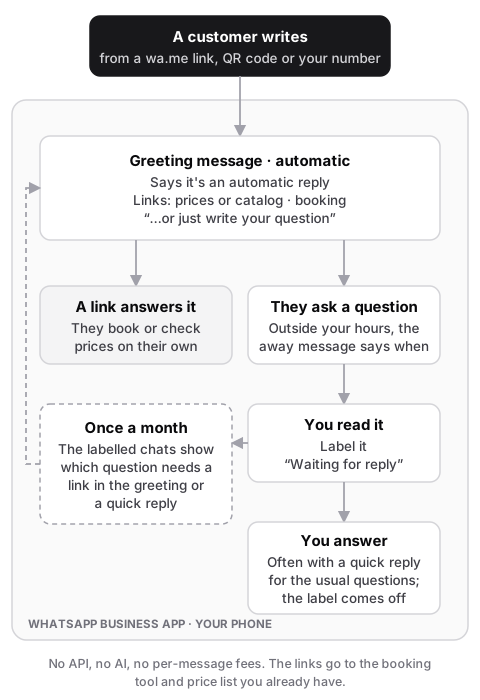 How a message flows. Everything inside the frame runs in the WhatsApp Business app on your phone.
Who it's for
- You answer WhatsApp yourself, often after hours.
- You get 10–50 enquiries a week, and most are the same 3–4 questions: prices, availability or booking, location or hours, "can you do X?".
- You already have a booking link or a price list, even if it's only a PDF.
What it's made of
| Need | WhatsApp Business app feature |
|---|---|
| A first reply that says it's automatic | Greeting message, sent on a contact's first message or after 14 days of silence |
| Prices and the offer | Catalog with prices and photos, or a link in the greeting |
| Booking | Your booking link in the greeting, plus a quick reply for when you answer yourself |
| A reply-time promise | Away message on a schedule, outside the hours you actually answer |
| Knowing which chats still need you | Labels, such as "Waiting for reply", "New customer", "Booked" |
| Getting people into the chat | A wa.me short link with a pre-filled message, and a QR code for the shop, the van or the business card |
The setup
- Greeting message. Who you are, that this is an automatic reply, the one or two links that answer most questions (prices, booking), and "or just write your question".
- Away message. On a schedule outside the hours you actually answer. It says when you'll reply, not only that you're away.
- Quick replies for the answers you type over and over: booking link, price list, location and parking, payment details.
- Labels you apply while reading. A chat keeps "Waiting for reply" until it's answered. Once a month, the labelled chats show which question deserves a quick reply, or a place in the greeting.
- Short link and QR code on the website, the e-mail signature and printed material.
You keep replying from the app on your phone, the same as now. There's nothing new to learn.
Honest by default
No AI is involved, but the greeting still says the reply is automatic. It sets expectations. A person is always reachable: people just write, and the away message tells them when they'll hear back.
Checklist
- Your number is on the WhatsApp Business app. The regular WhatsApp app has none of this. Moving a number from WhatsApp to WhatsApp Business keeps your chats.
- Business profile: name, category, address or service area, hours, website.
- Greeting, away message and 3–5 quick replies, written in your own tone.
- Catalog, only if you sell a fixed set of products or services with prices.
- A test from a second phone: a first message gets the greeting, a message outside hours gets the away message.
- A month later: go through the labelled chats and decide what goes into the greeting or a quick reply next.
When you outgrow it
The app runs out when the questions need other systems to answer: is a slot free, is it in stock, where's my order. That's when connecting WhatsApp to your calendar, e-mail or shop starts to pay for itself. See WhatsApp booking agent.